
NoChatReports Download

No Chat Reports config, explained

Four JSON files in the NoChatReports folder inside your config directory. Most of what players want lives in two of them.

NCR-Client.json

Client-side behavior; never generated on dedicated servers. The ones worth knowing: defaultSigningMode (see below), showServerSafety for the chat-screen status icon, hideInsecureMessageIndicators and its "Modified"/system-message siblings for the colored chat bars, hideWarningToast for the corner toast on unsigned servers, disableTelemetry plus removeTelemetryButton, and demandOnServer, which refuses to join servers that don't run the mod. whitelistedServers collects the servers you told the warning screen to stop nagging about.
NCR-Common.json

Server-side options (also present on clients, for LAN hosting). convertToGameMessage turns player chat into unsigned system messages so nothing is reportable and vanilla clients see no "Not Secure" flags. demandOnClient makes the server require the mod from every joining player, with demandOnClientMessage as the disconnect text. addQueryData is what advertises the server as safe to modded clients.

NCR-ServerPreferences.json

Per-server signing choices. You rarely edit this by hand: clicking the safety status button in the chat screen writes it for you.

NCR-Encryption.json

Legacy chat encryption settings, only meaningful on builds up to 1.21.4. The encryption page covers what it did and what replaced it.

The four signing modes

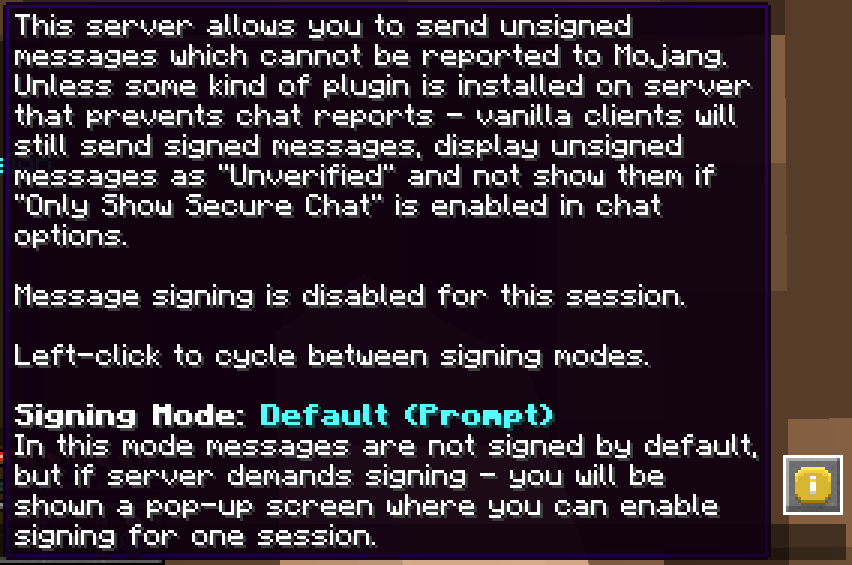
defaultSigningMode decides what happens when a server asks for signed chat. Never ignores every signing request. Prompt (the default) keeps messages unsigned until a server demands signing, then shows you a pop-up to allow it for one session. On Demand does the same but enables signing silently instead of asking. Always signs from the moment you join, like vanilla. Per-server overrides beat the default, and you set those by clicking the status button in chat.

No Chat Reports tooltip showing the current signing mode, Default (Prompt), and what the server does with messages
The signing mode and safety level, live in game: hover the status icon and the mod reads your config back to you.

The six safety levels

The chat-screen icon (if showServerSafety is on) tells you where the current server stands. Unknown: send one message and the mod figures it out. Secure, the green check: the server runs No Chat Reports or blocks reporting some other way. Unintrusive: the server allows unsigned chat but doesn't strip signatures, so vanilla players remain reportable while you're covered. Insecure: the server enforces signed chat and everything you say can be reported. Realms, the red eye: its own special situation. Undefined: probably a bug, worth reporting with logs.

Condensed from the official wiki's Configuration Files article, which stays the canonical reference.

Get No Chat Reports

Every build, hosted here, with checksums.